


Last Updated: October 25, 2026
Quick Summary
Standing desk stability problems come from four places: frame design, assembly, the floor and the setup. Work through our checks in order, clearing the desk, raising it to full height, pushing each corner, tightening every bolt and inspecting the feet, and most wobble disappears by step five.
- A desk that only wobbles at full height points to frame flex rather than assembly.
- Turn levelling feet clockwise to extend them and anticlockwise to retract them.
- Re-torque every frame bolt once or twice a year, working from the feet upward.
- A desktop wider than the frame's recommended span causes overhang and flex.
- The Stockholm Extra Heavy Duty Sit Stand Desk carries up to 160kg with a 10 year guarantee.
Table of Contents
- Why Standing Desk Stability Issues Happen in the First Place
- How to Fix a Wobbly Standing Desk: A Step-by-Step Check
- Why Your Standing Desk Wobbles at Full Height
- Standing Desk Uneven Floor Adjustment: Levelling Without the Guesswork
- Standing Desk Loose Bolts: The Fix Most People Miss
- When Frame, Desktop Size and Load Are the Real Cause
- Choosing a Desk Built to Stay Rock-Solid
- Frequently Asked Questions
Why Standing Desk Stability Issues Happen in the First Place
Standing desk stability is a simple idea with a complicated reality: the higher a desk rises, the more forces the frame, floor and fixings have to fight. A desk that feels solid at sitting height can turn into a rocking horse once it reaches eye level, and most buyers only discover this after delivery. The causes are rarely mysterious once you know where to look.
Stability problems come from four places:
- Frame design - thin legs and narrow spans flex under load
- Assembly - loose bolts and skipped steps leave play in the joints
- The floor - uneven surfaces tilt the whole structure
- The setup - a desktop that is too big or too heavy for its frame
The Health and Safety Executive guidance on display screen equipment makes clear that workstations should be stable and adjustable, which is hard to achieve on a desk that rocks every time you type. Fixing the issue starts with identifying which of these four causes applies to your desk.
How to Fix a Wobbly Standing Desk: A Step-by-Step Check
Learning how to fix a wobbly standing desk is mostly a process of elimination. Work through these checks in order, because each one rules out a cause before you move to the next.
- Clear the desk. Remove monitors, speakers and clutter so you can feel the frame's movement without weight masking it.
- Raise the desk to full height. Wobble that only appears at the top points to frame flex, not assembly.
- Push each corner gently. A corner that moves while the others stay firm usually signals a loose fixing nearby.
- Check every bolt and screw. Hand-tight is not tight enough; use the correct tool and work around the frame.
- Inspect the feet. Levelling feet should sit flat and firm on the floor with no gap underneath.
- Test the floor. Rock the desk gently front to back and side to side to see whether the floor itself is the culprit.
- Re-check the desktop fixings. The screws joining the top to the frame work loose over time, especially on wider tops.
Most wobble disappears by step five. If it does not, the problem is structural rather than something a spanner can solve.
Work through these checks in order, because each one rules out a cause before you move to the next.
| Step | What to do | What it rules out |
|---|---|---|
| 1 | Clear the desk of monitors and clutter | Weight masking the frame's movement |
| 2 | Raise the desk to full height | Assembly, if wobble only appears at the top |
| 3 | Push each corner gently | A loose fixing nearby |
| 4 | Check every bolt and screw with the correct tool | Play in the joints |
| 5 | Inspect the feet for gaps | Levelling feet not sitting flat |
| 6 | Rock the desk front to back and side to side | The floor itself |
| 7 | Re-check the desktop fixings | Screws working loose on wider tops |
Why Your Standing Desk Wobbles at Full Height
A standing desk wobbles at full height because the legs are extended, and extended legs flex. This is physics, not a fault. Every telescopic column has some play between its sections, and that play multiplies as the desk rises. A desk at 700mm has short, stiff legs; the same desk at 1.2 metres has long levers that amplify every keystroke and nudge.
The practical consequences are worth knowing:
- Typing feels shakier the higher you go
- Monitor screens can visibly sway
- A heavier load makes the flex worse, not better
Better frames reduce this with tighter tolerances, chunkier fixings and wider feet. The HSE's guidance on working with display screen equipment stresses stable, comfortable positioning, and a swaying monitor undermines both. If your desk only misbehaves at the top of its range, the frame's rigidity at height is the limiting factor, and no amount of tightening will change the design.
Standing Desk Uneven Floor Adjustment: Levelling Without the Guesswork
Standing desk uneven floor adjustment is the step most people skip, and it causes more wobble than any loose bolt. Most desks have threaded levelling feet under each leg. Turning a foot clockwise extends it; anticlockwise retracts it. The goal is for all four feet to bear equal weight on the floor.
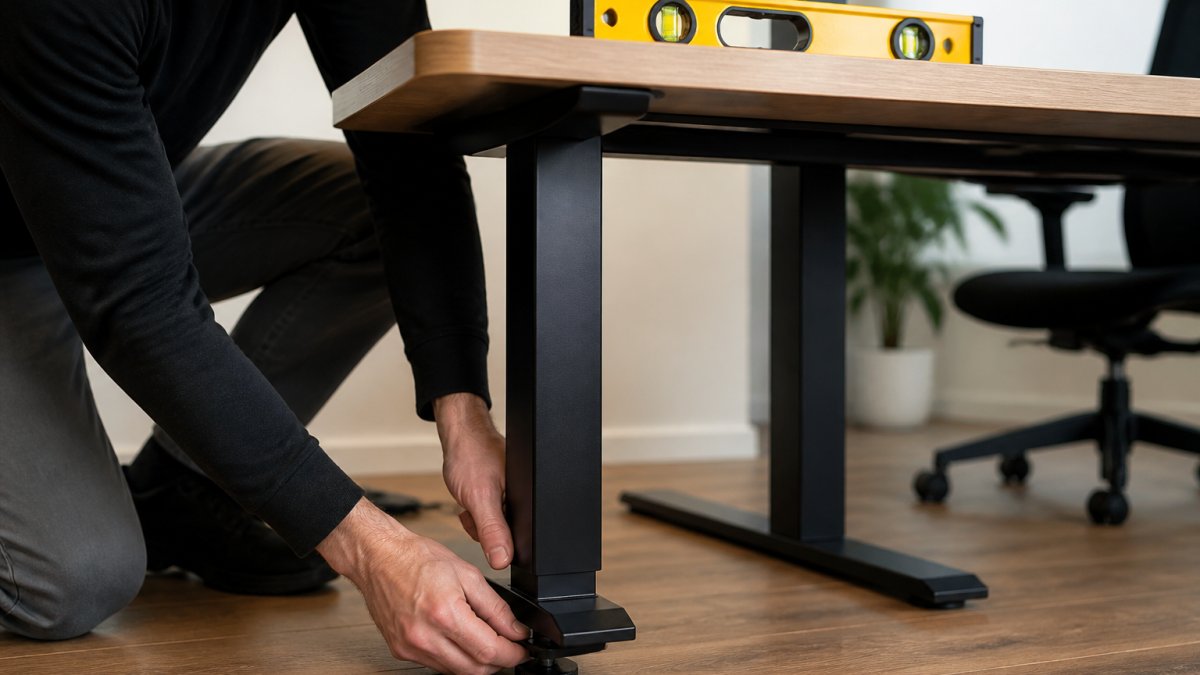
Here is a reliable method:
- Place a spirit level on the desktop, front to back
- Adjust the feet until the bubble centres
- Repeat side to side
- Press down on each corner in turn; any corner that dips needs its foot extended
Watch out: over-extending one foot to chase a slope lifts the opposite corner off the floor, which creates a rocking desk rather than a level one. Old floorboards and carpet gripper rods are common culprits in period homes. A rigid mat under the desk can even out small variations, but it will not fix a foot that is set wrong.
Stockholm Extra Heavy Duty Sit Stand Desk (with Bluetooth Control) →
Standing Desk Loose Bolts: The Fix Most People Miss
Standing desk loose bolts are the quiet cause of wobble that builds over months. Frames are assembled with dozens of fixings, and vibration from daily raising and lowering works them loose gradually. The desk felt solid in January and feels vague by autumn, with no obvious event in between.
The fix is a scheduled re-torque. Once or twice a year:
- Tighten every bolt on the frame, working from the feet upward
- Check the brackets joining the legs to the cross beam
- Tighten the screws holding the desktop to the frame
- Look for bolts that turn easily; those were the loose ones
A common mistake is tightening by feel alone. Use the correct hex or spanner and check each fixing properly, because a bolt that feels snug can still have a millimetre of play. The HSE guidance on safe use of work equipment treats regular inspection as basic good practice, and a desk is no different from any other piece of equipment in daily use.
When Frame, Desktop Size and Load Are the Real Cause
Sometimes the wobble is designed in. A wide or deep desktop on a standard frame creates overhang, and overhang acts like a diving board: press the front edge and the whole top flexes. The same happens when a desk carries more weight than its frame was built for.
Three signals point here:
- The wobble appeared when you added a heavier monitor or speakers
- The desktop is wider than the frame's recommended span
- The front edge dips when you lean on it
The fix is support, not tightening. Deeper support arms stiffen a large top, and a longer cross beam widens the frame's footprint. FRISKA DESK sells an extra-long cross beam for Stockholm desks that extends frame width to 2160mm, and extra deep under desk support arms for desktops deeper than 800mm. Both tackle flex at its source rather than masking it.

Choosing a Desk Built to Stay Rock-Solid
The most reliable fix for standing desk stability issues is buying a desk that was engineered against them. Frame gauge, fixing size, tolerance and foot design decide whether a desk stays firm at full height for a decade or starts swaying within a year. Readers still deciding which desk suits their home office can consult the best standing desk for home office guide before committing.
What to look for:
- Chunky fixings and tight tolerances - play comes from gaps, and quality frames have fewer
- A high load rating - headroom above your actual load means less strain
- Wide, stable feet - a broader base resists rocking
- A proven height range - stability at the top of the range is what matters
FRISKA DESK builds desks in Sweden with British timber tops, and the Stockholm Extra Heavy Duty Sit Stand Desk carries up to 160kg with a 10 year guarantee. For gamers and heavy setups, the NINJA Professional Extreme gaming desk offers the same payload with an anti-collision sensor.


Frequently Asked Questions
Is it normal for a standing desk to wobble at full height?
A small amount of movement is normal once a desk is raised, because the frame is extended and has more flex. What is not normal is a desk that shakes enough to spill a drink or makes typing feel unstable. If your standing desk wobbles at full height to that degree, check the floor for level, tighten every bolt and confirm the load is within the manufacturer's limit. A desk rated to 160kg, such as the Stockholm Extra Heavy Duty, gives you far more headroom before stability suffers.
Can an uneven floor make a standing desk wobble?
Yes, and it is one of the most common causes. A floor that is out by even a few millimetres will let one leg sit slightly higher, so the desk rocks when you lean on it. Fix it with standing desk uneven floor adjustment: wind the levelling feet down on the low side until all four contact the floor evenly, then check with a spirit level across the desktop. If the floor is badly sloped, a thin mat or a small shim under the feet will settle it.
How do I fix a wobbly standing desk without replacing it?
Work through the cheap fixes first. Tighten all frame and leg bolts with the correct Allen key, re-check them after a week of use, level the feet against the floor, and move the desk away from any spot where the floor flexes. Reduce the load if you are near the limit and check that the desktop is properly fixed to the frame. Most wobble traces back to loose fixings or an uneven floor rather than a faulty frame.
When should I contact the manufacturer about a wobbly standing desk?
Get in touch if the wobble continues after you have tightened every bolt, levelled the feet and confirmed the desk is within its load rating. Also contact them if you hear creaking from the motor housing, see cracks around the fixing points, or the desk moves at the joints rather than the feet. A desk with a 10 year guarantee, like those from FRISKA DESK, is covered for exactly this kind of fault, so keep your order details to hand.
A wobbly desk is not something to live with; it is a problem with a cause you can find. FRISKA DESK designs desks with tighter tolerances, chunkier fixings and market-leading stability at full height, backed by free next day delivery to mainland UK and award-winning support. Get started with FRISKA DESK and work at a desk that stays rock-solid from sitting height to standing.
