


Table of Contents
- Why an Ergonomic Home Office Matters
- Your Home Office Ergonomics Checklist
- Getting Correct Sitting Posture at a Desk
- Monitor Height and Distance: Getting Your Screen Right
- A Step-by-Step Standing Desk Setup
- Choosing Ergonomic Furniture That Fits Your Space
- Common Mistakes to Avoid
- Conclusion
- Frequently Asked Questions
Last Updated: 21 October 2026
Why an Ergonomic Home Office Matters
An ergonomic home office is a workspace arranged around the body of the person using it, so that screens, seat and desk sit at the right height for that individual rather than forcing the body to adapt to the furniture. Getting this right matters because the average desk worker spends the majority of the working day seated, and small mismatches in height compound over months. This guide from FRISKA DESK walks through the practical steps: chair setup, monitor placement, standing desk height and the furniture decisions that hold it all together. Below, we'll show you exactly how to set up an ergonomic home office equipment setup in the right order, starting with the chair most people adjust last.

Your Home Office Ergonomics Checklist
A home office ergonomics checklist is a short sequence of adjustments made in a fixed order, because each one affects the next. Feet first, then seat, then screen, then peripherals. Skip a step and the rest will not hold.
- Feet flat on the floor, or on a footrest if they don't reach
- Seat height set so thighs sit roughly level with the floor
- Chair depth adjusted so the backrest contacts the lower back
- Lumbar support positioned in the small of the back, not the mid-back
- Screen top at or just below eye level
- Screen roughly an arm's length away
- Keyboard and mouse close enough that elbows stay near 90 degrees
- Desk height allowing relaxed shoulders while typing
- Regular movement breaks built into the day
Work through this list once properly rather than tweaking repeatedly. The Health and Safety Executive guidance on display screen equipment sets out the same principle for workplace workstations: adjust the equipment to the person, not the other way round.
Getting Correct Sitting Posture at a Desk
Correct sitting posture at a desk means feet supported, thighs level, lower back supported by the chair, and shoulders relaxed with elbows close to the body. It does not mean sitting rigidly upright for eight hours.
The most common mistake is setting seat height by what feels comfortable in the first thirty seconds. A seat that feels right immediately is usually too high, because the feet dangle and the body compensates by slumping. Set the height so the feet rest flat, then check that the hips are level with or slightly above the knees.
Chair depth matters as much as height. If the seat pan presses into the back of the knees, the chair is too deep and the user will perch forward to escape it. A sliding seat solves this for shorter and taller users alike.
Setting Seat Height and Chair Adjustments
Start with the gas lift, then work through depth, lumbar and arms in that order. Each adjustment changes what the others need to do.
A chair with a weight-responsive mechanism removes much of the guesswork, since the recline resistance sets itself rather than requiring a tension knob. The FRISKA DESK Ystad Ergonomic Mesh Task Chair, at £341.67, uses this approach, with a seat height range of 460-590mm, a sliding seat adjustable from 465 to 525mm, and lumbar support with 80mm of travel. It arrives fully assembled with a five-year guarantee.
Monitor Height and Distance: Getting Your Screen Right
Monitor height and distance are correct when the top of the screen sits at or just below eye level and the screen is roughly an arm's length away. This keeps the neck neutral and reduces the constant downward tilt that causes upper-back tension.
Laptop users have a specific problem here: the screen and keyboard are joined, so a comfortable typing height puts the screen far too low. The fix is a stand plus a separate keyboard.
- Screen top: level with the eyes, or slightly below
- Distance: about one arm's length, extended from the shoulder
- Tilt: slightly back, so the screen faces the eyes squarely
- Lighting: positioned to avoid glare and reflections on the screen
A monitor arm gives the most control. The FRISKA DESK Kalix Extra Heavy Duty Single Monitor Arm, £130.83, holds screens up to 12kg, with tool-free height adjustment and 422mm of reach. For laptop-only setups, the Ulrika Adjustable Laptop Stand at £18.33 lifts the screen to a sensible height and folds nearly flat for travel.
A Step-by-Step Standing Desk Setup
Setting up a standing desk properly takes about ten minutes and follows a fixed sequence: desk height first, then monitor, then peripherals, then a movement routine. The order matters because raising the desk changes where the screen needs to sit.
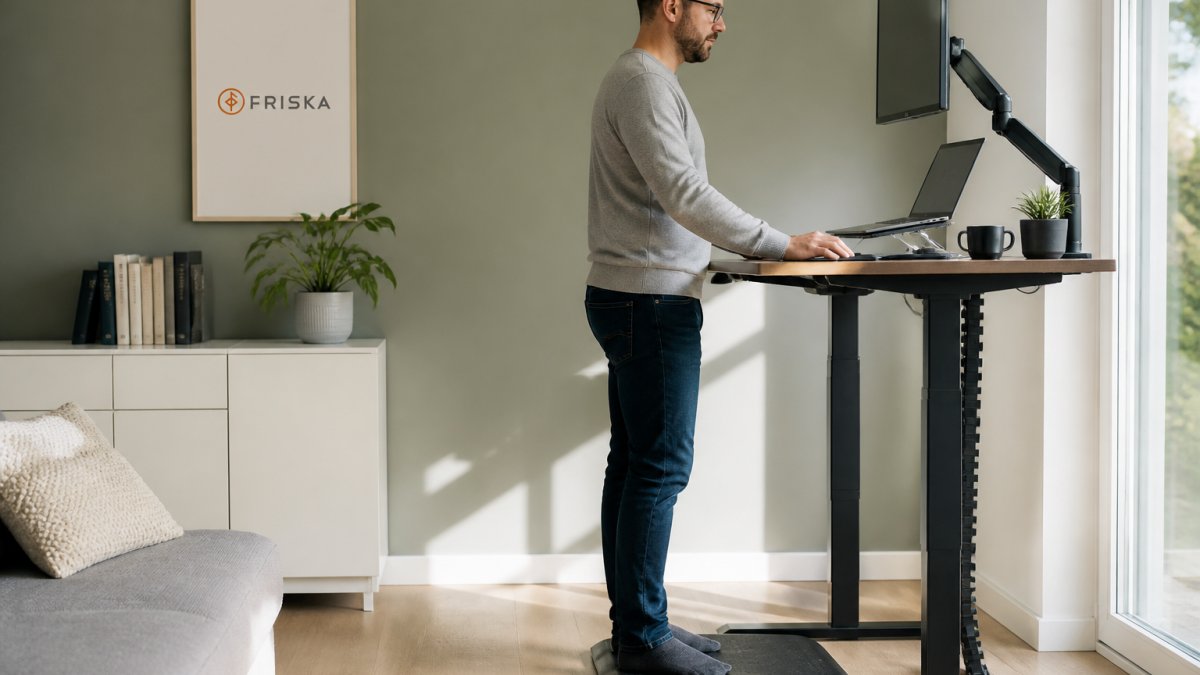
- Clear the desk and set it to a comfortable seated height first
- Sit down and adjust the chair using the checklist above
- Raise the desk until the elbows sit at roughly 90 degrees with shoulders relaxed
- Re-check monitor height at both seated and standing positions
- Add an anti-fatigue mat if standing for extended periods
- Set a reminder to alternate between sitting and standing
The FRISKA DESK Stockholm Signature Standing Desk, £665, adjusts from 595mm to 1.3 metres, which covers seated use for most people and standing use for users up to about 2.1 metres. It carries a 120kg load including the desktop and comes with a ten-year guarantee. Desks are delivered free next working day to mainland UK.
Finding Your Standing Height and Building a Routine
Standing height is correct when the elbows rest at about 90 degrees and the shoulders stay down. A useful starting point is roughly halfway between the hip and the floor, plus a little, then adjust from there.
Ystad Ergonomic Mesh Task Chair →
The bigger challenge is routine. Many people buy a standing desk, stand for two days, then never raise it again. A workable pattern is to alternate every 30 to 45 minutes rather than aiming for a fixed number of standing hours. Standing all day brings its own problems, and the goal is variation, not endurance.
Choosing Ergonomic Furniture That Fits Your Space
Furniture selection comes down to three measurements: available floor space, the height range the desk needs to cover, and the load it must carry. Get those three right and most of the remaining decisions resolve themselves.
Small rooms constrain the choice more than anything else. A desk that adjusts through a wide height range and carries a modest footprint usually serves better than a larger fixed-height model. Bespoke desk sizes help where a standard width will not fit.
| Consideration | What to check | Why it matters |
|---|---|---|
| Floor space | Desk width and depth against the room | Prevents a desk that dominates a small room |
| Height range | Lowest and highest setting | Must cover seated and standing use for the user |
| Load capacity | Weight of monitors, desktop and equipment | Overloading strains the motors |
| Guarantee | Length and what it covers | Indicates expected service life |
| Delivery and assembly | Whether it arrives built | Affects setup time and effort |
FRISKA DESK builds Swedish-engineered standing desks with British timber, offers bespoke sizes, free next day delivery to mainland UK and a ten-year guarantee on desks. The Nyborg Anti-Fatigue Standing Mat, £72.50, is worth adding for anyone who plans to stand for longer stretches, though it is not designed for use under a chair.

Common Mistakes to Avoid
The most frequent error is adjusting the chair to suit the desk rather than the other way round. A desk that is too high forces the shoulders up; a desk that is too low encourages slumping. Set the chair for the body, then set the desk for the chair.
Other recurring mistakes:
- Buying a standing desk and never standing. Without a routine, the desk becomes an expensive fixed desk. Set reminders.
- Ignoring the laptop problem. A laptop alone cannot deliver good posture. It needs a stand and an external keyboard.
- Skipping movement. No setup replaces getting up and moving. Posture held statically for hours is still static posture.
- Over-tightening the setup once. Bodies change, and so do chairs. Re-check the checklist every few months.
- Choosing on price alone. A cheap desk with a short guarantee often costs more over time than one built to last.
Conclusion
Setting up a workspace that genuinely supports the body takes an afternoon, not a fortnight, but it only works if the adjustments are made in the right order and revisited as habits change. The harder challenge is sustaining the routine once the novelty fades. FRISKA DESK builds standing desks with Swedish engineering and British timber, backed by a ten-year guarantee, free next day delivery to mainland UK and award-winning support, alongside chairs and accessories designed to work as one system. Get started with FRISKA DESK and build a workspace that keeps working long after the first week.
Frequently Asked Questions
How do I set up an ergonomic home office?
Start with your chair: set the seat height so your feet sit flat and knees are roughly level with your hips, then adjust lumbar support to fill your lower back. Raise your monitor so the top of the screen is at or just below eye level and about an arm's length away. Keep your keyboard and mouse close so elbows stay near 90 degrees, and add a footrest if your feet dangle. Finish by positioning a light source to the side of your screen to cut glare.
What is the correct sitting posture at a desk?
Sit with your back supported by the chair's backrest, feet flat on the floor or a footrest, and thighs roughly parallel to the ground. Keep shoulders relaxed and elbows bent to about 90 degrees, with wrists straight as you type. Your head should sit over your shoulders rather than jutting forward towards the screen. Aim to change position every 30 to 45 minutes, because no single posture is ideal for a full working day.
How high should my monitor be, and how far away?
Position the top of your screen at or slightly below eye level so you look down gently rather than up or straight ahead. Place it roughly an arm's length away, about 50 to 70cm, and adjust if you find yourself leaning in. A monitor arm makes this far easier to fine-tune, and it lets you raise the screen when you switch to standing. If you use a laptop, a stand plus an external keyboard keeps the screen at a sensible height.
Can I make my home office ergonomic without buying new furniture?
Yes, in the short term. Raise your laptop on a stack of books or a stand and add a separate keyboard and mouse so your hands stay low. Put a cushion behind your lower back and a box or stool under your feet if they don't reach the floor. Move your screen to cut window glare and keep frequently used items within easy reach. These fixes help, but a chair with adjustable lumbar support and seat depth will do more for long sessions.
Is a standing desk better for working from home?
A standing desk is useful because it lets you alternate between sitting and standing rather than staying in one position all day. The benefit comes from the movement and variation, not from standing constantly. Aim to switch posture every 30 to 60 minutes and build up standing time gradually. Look for a desk with a wide height range, quiet dual motors and a solid frame, so it stays stable at standing height.
How often should I take breaks from sitting at my desk?
Stand up and move at least once every 30 to 45 minutes, even if only for a minute or two. Use the change to refill a glass of water, stretch your shoulders or walk to another room. Pairing breaks with a sit-stand routine works well: stand for part of a task, sit for the next, and take a short walk between them. Setting a timer for the first week helps the habit stick.