


Table of Contents
- Why the Right Sit Stand Desk Matters for Back Pain
- The 5 Best Sit Stand Desks for Back Pain at a Glance
- 1. Stockholm Signature Standing Desk: Best Overall for Back Support
- 2. Ljungby Manual Hand Crank Desk: Best Budget Option
- 3. Aspa Executive Designer Desk: Best for Premium Stability
- 4. Invik Mobile Micro-Workstation: Best for Small Spaces
- 5. Duo Double Standing Desk: Best for Shared Workspaces
- How to Set Desk Height for Posture and Back Pain Relief
- Frequently Asked Questions
Last Updated: October 21, 2026
Why the Right Sit Stand Desk Matters for Back Pain
The 5 best sit stand desks for back pain in the UK all share one trait: they hold their position without wobble. That matters more than most buyers realise. A desk that shudders as you type keeps your shoulders tense, and tension is the enemy of a sore back.
FRISKA DESK builds frames in Sweden and desktops from British timber, and the range below reflects that split: solid engineering, UK finishing. The NHS guidance on back pain is clear that staying active and changing position regularly helps most people, and a height-adjustable desk makes that switching easy rather than a chore.
Below, the five models are ranked by how well each supports posture, stability and daily use. Every price is the current listed price.
The 5 Best Sit Stand Desks for Back Pain at a Glance
| Desk | Price | Best For | Height Range | Max Load |
|---|---|---|---|---|
| Stockholm Signature | £665 | All-round back support | 595-1300 mm | 120 kg |
| Ljungby Manual | £360 | Tight budgets | 715-1215 mm | 80 kg |
| Aspa Executive | £1,295 | Premium stability | 680-1180 mm | 120 kg |
| Invik Mobile | £550 | Small rooms | 695-1355 mm | 60 kg |
| Duo Double | £1,572.50 | Two-person setups | 595-1300 mm | 120 kg each |
1. Stockholm Signature Standing Desk: Best Overall for Back Support
The Stockholm Signature is the strongest all-round pick because it covers the full range of body sizes. It drops to 595 mm and rises to 1.3 metres, which suits anyone up to roughly 2.1 metres tall. Dual motors make for speedy yet whisper quiet raising and lowering. In fact, the Stockholm Signature sit/stand desk offers noise and speed levels that are not just among the very best in its class, but in any class, so adjusting mid-call won't disrupt the room.

Load capacity reaches 120 kg including the desktop. The frame is Swedish-engineered with a raw metal appearance, finished in a clear matt lacquer to give the ultimate vintage industrial look. The desktops are crafted with premium British timber.
Bluetooth and physical controls both work, and the anti-collision sensor is adjustable through the app. A 10-year guarantee covers the motors and electrics.
Pros: wide height range, quiet operation, app and manual control, 10-year guarantee. Cons: the industrial frame finish won't suit every interior.
2. Ljungby Manual Hand Crank Desk: Best Budget Option
For buyers who want Swedish build quality without electrics, the Ljungby is the sensible entry point. The hand crank removes the need for a power supply, so it can sit anywhere in a room. The adjustment range runs from 715 mm to 1215 mm across three available widths.

It carries up to 80 kg including the worktop and uses the same grade of components as the electric models. The powder-coated finish resists scratches, which helps in shared or educational settings.
Pros: lowest price in the range, no power cable, 10-year guarantee. Cons: no memory presets, and cranking takes effort you may not want mid-task.
3. Aspa Executive Designer Desk: Best for Premium Stability
Stability at full height is where cheap desks fail, and the Aspa is built to avoid that. Four legs and dual Linak motors hold the frame steady, and the 120 kg load rating means a monitor arm, dual screens and a laptop won't strain it.
The height range is 680 mm to 1180 mm, which suits users up to about 2 metres. Noise is rated at 42 dBA and speed at 32 mm per second.
Pros: four-leg design, Linak motors, strong at height. Cons: the highest price of the single-desk options, and a narrower range than the Stockholm.
4. Invik Mobile Micro-Workstation: Best for Small Spaces
A small flat creates a specific problem: a fixed desk eats the room. The Invik solves it with four lockable castors, so it can be wheeled against a wall when the working day ends. Two compact desktop sizes keep the footprint down.
Stockholm Signature Standing Desk (with Bluetooth Control) →
This extremely versatile mobile height adjustable workstation is powered by a mighty Swedish actuator which gives a vast height range of 695 mm-1355 mm and boasts an electronic anti-collision mechanism, making it extremely safe to use and is amongst the quietest and quickest height adjustable tables available. With a maximum loading of 60 kg, this heavy-duty mobile standing desk frame can carry more than can be loaded onto the desk space, it is finished in a tough scratch-resistant powder coating and is available with 18 different worktop finishes.
Pros: moves easily, wide height range, lockable wheels. Cons: 60 kg limit rules out heavy multi-monitor rigs.
5. Duo Double Standing Desk: Best for Shared Workspaces
Two people, one frame, independent controls. The Duo lets each user set their own height on a shared back-to-back structure, with four motors in total and 120 kg capacity per desktop. It lowers to 595mm, ideal for many wheelchair users, and raises to 1.3 metres, suitable even if you’re 2.1 metres tall. A total of four motors make for speedy yet whisper quiet raising and lowering. In fact, the Duo offers noise and speed levels that are not just among the very best in its class, but in any class.
Privacy screens can be added, and units join to form bench desking.
Pros: independent adjustment, sturdy shared frame, Bluetooth control. Cons: the highest price here, and it needs floor space.
How to Set Desk Height for Posture and Back Pain Relief
Correct desk height is the one where your elbows sit at roughly 90 degrees with shoulders relaxed. Sit with feet flat, then raise or lower until your forearms are level with the desk surface. For standing, the top of the desk should sit just below elbow height.
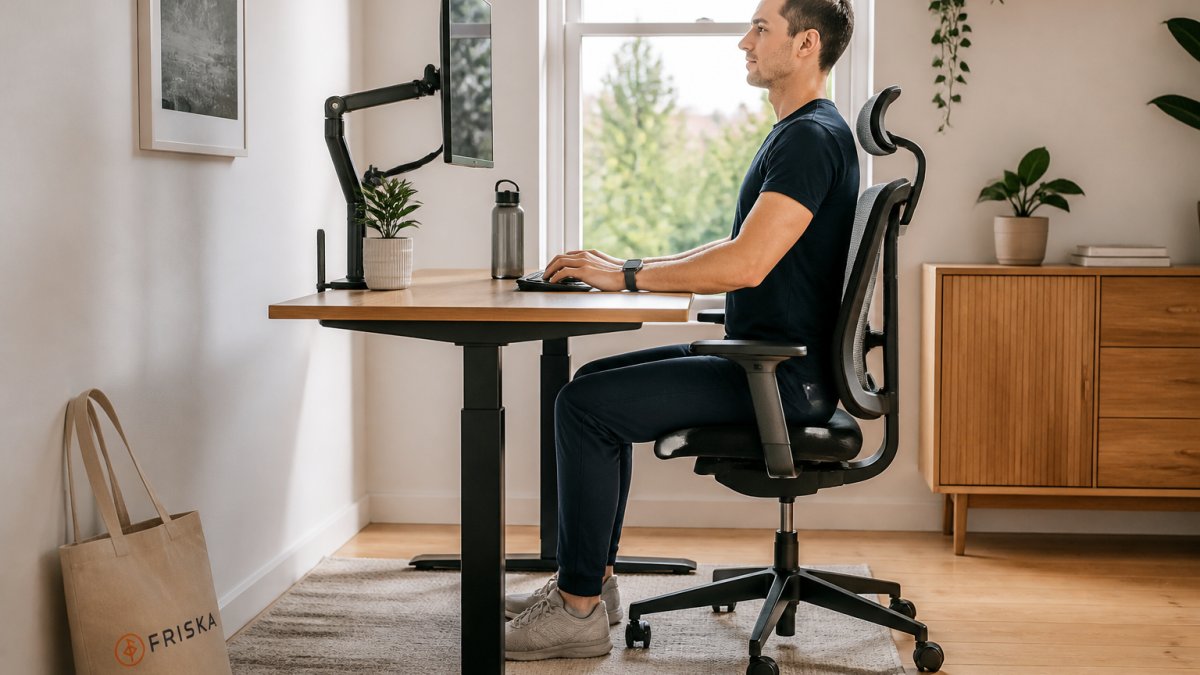
A few rules that make the setup work:
- Keep the monitor top at or just below eye level to stop the neck craning forward.
- Alternate between sitting and standing rather than standing for long blocks.
- Use an anti-fatigue mat if you stand on a hard floor.
- Recheck height whenever you change footwear or chair.
The HSE guidance on display screen equipment treats posture and regular breaks as core parts of workstation setup, not optional extras. The Chartered Society of Physiotherapy also stresses that movement matters more than any single perfect position.
Frequently Asked Questions
Are sit-stand desks good for back pain?
Yes, they can be very helpful. Sit-stand desks allow you to alternate between sitting and standing, which reduces the static load on your spine and can alleviate discomfort. Standing engages your core muscles and improves circulation, which can help reduce back pain associated with prolonged sitting. However, they are not a cure-all; correct posture and regular movement are key. A desk like the Stockholm Signature, with its wide height range, helps you find the perfect ergonomic position for your body.
What is the best desk height for back pain?
The ideal height depends on your body and whether you are sitting or standing. For sitting, your elbows should be at a 90-degree angle with your shoulders relaxed, and your feet flat on the floor. For standing, your elbows should also be at 90 degrees, with your monitor at eye level. A desk with a wide adjustment range, such as the Stockholm Signature (595mm to 1.3 metres), allows you to find the precise height for both postures, which is crucial for preventing back strain.
Can a standing desk make back pain worse?
It can if used incorrectly. Standing for too long without a break can cause fatigue and strain in your lower back and legs. The key is to transition between sitting and standing regularly, rather than standing all day. It's also vital to set the desk to the correct height. If the desk is too high or too low, it can lead to poor posture and exacerbate pain. Using an anti-fatigue mat and wearing supportive footwear can also help.
How long should you stand at a sit-stand desk?
There is no single rule, but a common recommendation is to start with 30 minutes of standing for every hour of sitting, and gradually increase your standing time as your body adjusts. Aim for a total of 2-4 hours of standing spread throughout the day. The most important factor is to listen to your body and change position before you feel discomfort. Setting a timer or using the memory presets on an electric desk like the Stockholm Signature can help you build a healthy routine.
Is an electric or manual sit-stand desk better for back pain?
An electric sit-stand desk is generally better for back pain because it makes transitioning between sitting and standing effortless. This ease of use encourages you to change posture more frequently, which is beneficial for your back. Manual desks, like the Ljungby, are a great budget-friendly option but require more physical effort to adjust. For managing back pain, the convenience of an electric desk like the Stockholm Signature is often worth the investment, as it removes a barrier to movement.
Back pain from desk work rarely has one fix, but an unstable or badly sized desk makes everything harder. FRISKA DESK addresses that with Swedish-engineered frames, British timber desktops, free next-day delivery to mainland UK and a 10-year guarantee, plus bespoke sizes when a standard footprint won't fit. Start with the Stockholm Signature if you want one desk that suits most bodies and most rooms, and get the height set correctly on day one.