


Table of Contents
- Step 1: Set Up Your Workstation to Improve Posture
- How to Set Up an Ergonomic Workstation That Fits You
- Correct Sitting Posture at a Desk: What It Actually Looks Like
- Desk Stretches for Neck and Shoulders You Can Do in Two Minutes
- How Often to Take Breaks From Sitting (and What to Do in Them)
- Common Mistakes That Undo Your Posture Work
- When to Seek Help for Posture-Related Pain
- Making Better Posture Stick: Your Next Steps
- Frequently Asked Questions
Last Updated: 15 October 2026
Step 1: Set Up Your Workstation to Improve Posture
Learning how to improve posture while working starts with one hard truth: your setup decides your posture before you do. At FRISKA DESK, we see this every day. No amount of willpower fixes a screen that sits too low.
The HSE guidance on display screen equipment is blunt about the basics. The top of your screen should sit level with your eyes. It should be about an arm's length away.
Get those two things right and most of the battle is won. Everything else in this guide builds on that foundation.
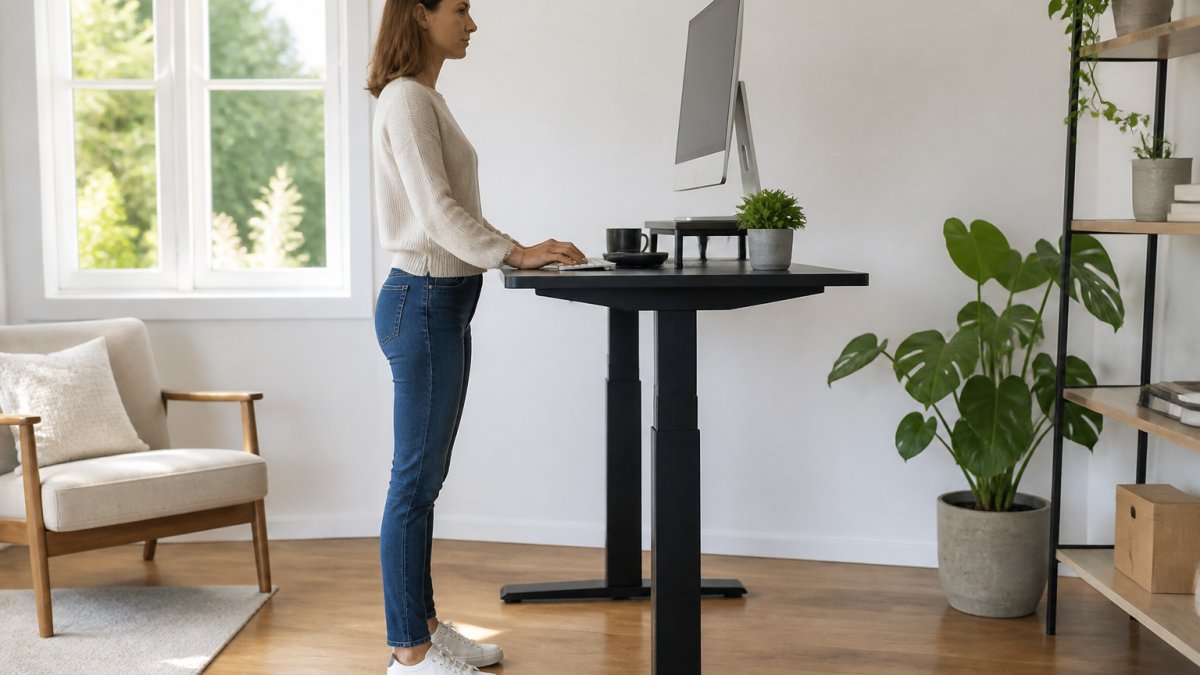
Screen height, keyboard position and chair depth
Three adjustments matter most. Get these right and your body will thank you.
- Screen height: Raise the top of the screen to eye level. A laptop stand or monitor shelf does this in seconds.
- Keyboard position: Keep elbows at roughly 90 degrees. Wrists should float, not rest on the desk edge.
- Chair depth: Slide the seat so your back touches the backrest. Leave a small gap behind your knees.
A common mistake is setting the chair first. Set the screen, then the keyboard, then the chair. Your eyes lead, your hands follow.

How to Set Up an Ergonomic Workstation That Fits You
An ergonomic workstation is a setup adjusted to your body, not a checklist copied from a catalogue. Height, reach and depth all change from person to person.
Here is the part most guides miss. There is no single "correct" desk height. There is only the height that fits you.
Desk height when sitting and standing
When sitting, your elbows should rest at about 90 degrees with shoulders relaxed. When standing, the desk should sit just below elbow height.
The NHS advice on sitting at a desk suggests keeping feet flat and thighs roughly parallel to the floor.
A sit/stand desk makes this simple. You raise it for standing, lower it for sitting, and keep working. Our Stockholm Standing Desk moves between 595mm and 1.3 metres, so it fits most users whether seated or upright.

- Sitting: elbows at 90 degrees, feet flat
- Standing: desk just below elbow height
- Change position every 30 to 60 minutes
Correct Sitting Posture at a Desk: What It Actually Looks Like
Correct sitting posture at a desk means ears over shoulders, shoulders over hips, and both feet on the floor. It is a balanced position, not a rigid one.
Think of your spine as a gentle S, not a straight line. Forcing it flat causes as much trouble as slumping.
- Ears stacked over shoulders
- Shoulders relaxed, not pulled back hard
- Lower back supported by the chair
- Knees level with or slightly below hips
- Feet flat, or on a footrest
A good chair does half the work. The Grace Mesh Back Adjustable Office Chair has height-adjustable lumbar support and a sliding seat, both of which help you hold this position without thinking about it.

Desk Stretches for Neck and Shoulders You Can Do in Two Minutes
Desk stretches for neck and shoulders take two minutes and prevent most stiffness. Do them before tension builds, not after.
Try this quick set, once or twice a day:
- Neck tilt: Drop your right ear towards your right shoulder. Hold 15 seconds. Swap sides.
- Shoulder rolls: Roll both shoulders back five times, then forward five times.
- Chest opener: Clasp hands behind your back. Gently lift and hold 15 seconds.
- Upper trap stretch: Tilt your head to one side and hold for 15 seconds each way.
Keep every movement slow. Never bounce or force a stretch.
How Often to Take Breaks From Sitting (and What to Do in Them)
Take a short break every 30 to 60 minutes. Stand up, move for two to three minutes, then sit back down.
Grace Mesh Back Adjustable Office Chair →
The NHS Live Well guidance on sitting recommends breaking up long periods of sitting with movement.
What you do in the break matters less than doing it. Make a drink. Walk to the window. Take a call standing up.
If you have a sit/stand desk, alternate. Stand for part of the morning, sit for part of the afternoon. The change itself is the point.
Common Mistakes That Undo Your Posture Work
The biggest mistake is treating posture as a one-off fix. You adjust your chair once, then slowly slump back into old habits.
Other common errors:
- Raising the monitor but never moving the keyboard
- Standing all day because sitting is "bad"
- Ignoring foot position entirely
- Skipping breaks because you are busy
- Buying equipment before fixing the basics
Standing all day is not the goal. Movement is. A sit/stand desk helps because it makes switching easy, not because standing is superior.
When to Seek Help for Posture-Related Pain
See a GP or physiotherapist if pain lasts more than a few weeks, worsens, or comes with numbness or tingling. Posture changes help, but they are not a treatment for a medical problem.
Do not self-diagnose. A qualified professional can tell the difference between ordinary stiffness and something that needs care.
A standing desk can support better habits. It cannot fix a trapped nerve or an injury.
Making Better Posture Stick: Your Next Steps
Better posture comes from small, repeatable changes. Fix your screen height. Set your chair depth. Move every half hour.
If you want a setup that makes this easy, our range is built for it. The Stockholm Standing Desk pairs Swedish engineering with premium British timber, comes with a 10 year guarantee, and includes free next day delivery to mainland UK. Bespoke sizes are available if your space is tight.
Get started with FRISKA DESK and build a workspace that helps you sit, stand and move better every day.
Frequently Asked Questions
How can I improve my posture while working at a desk?
Start with your setup: raise the screen so the top sits level with your eyes, keep the keyboard close enough that your elbows stay near 90 degrees, and set the chair so your feet rest flat. Then build movement in. Change position every 30 to 45 minutes, whether that means standing, stretching or walking to the kettle. Setup alone will not fix posture; the routine around it does most of the work.
Is standing at a desk better for your posture?
Standing is not automatically better, but alternating between sitting and standing is. Standing engages your legs and core and takes pressure off the lower back, yet standing still for hours brings its own stiffness. The practical answer is to split your day: sit for focused tasks, stand for calls and admin, and change height regularly. A sit/stand desk makes that switch easy, and models such as the Stockholm Standing Desk move between 595mm and 1.3 metres to suit most heights.
How often should I change position while working?
Aim to change position every 30 to 45 minutes. That could mean raising your desk to stand, adjusting the chair angle, or simply getting up for two minutes. The exact interval matters less than the habit of not staying locked in one position for long stretches. Pair each change with one of the desk stretches for neck and shoulders so movement becomes part of your working rhythm rather than an extra task.
When should I seek help for posture-related back or neck pain?
See a GP or physiotherapist if pain lasts more than a few weeks, wakes you at night, radiates down an arm or leg, or comes with numbness or weakness. Those signs need a proper assessment rather than a desk adjustment. For everyday aches, improving your workstation setup, taking regular breaks and using supportive equipment such as an adjustable chair can reduce strain while you wait for an appointment.